DataFrame
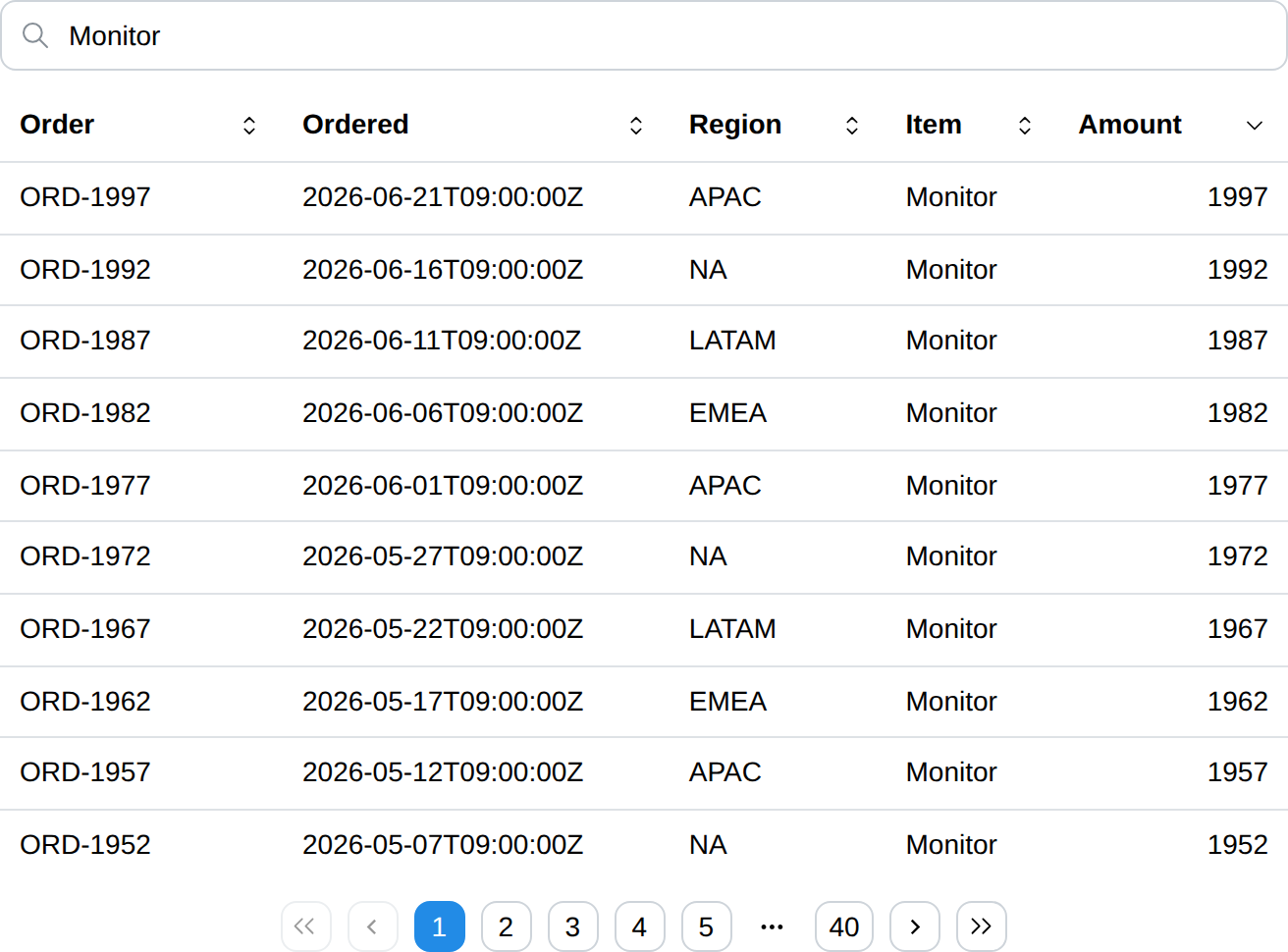
DataFrame component displays a table the user can sort, search and page through, and optionally pick rows from.
Sorting, searching and paging all happen in the browser, so none of them
reruns the page function. Table is the static counterpart: reach for it when
the rows are few and already in the order they should be read in, and for
DataFrame when the rows are many, or when the reader — not the page
function — should decide the order.
API
func DataFrame(c *tgframe.Container, head []string, rows [][]string, conf ...*DataFrameConf) []int
cis Parent container.headis the head of table. It cannot be empty.rowsis the body of table. Every row needs one cell per head entry; a row of any other length draws an error placeholder instead of the table and fails the run, the way a chart does on a series that does not line up with its labels.confis an optional configuration, at most one.
The return is the rows the user has picked, as indices into rows. It is
empty unless Selection says the rows can be picked, and empty
rather than nil when nothing is picked.
// DataFrameConf is the configuration for the DataFrame component.
type DataFrameConf struct {
	tgframe.Base // ID

	// Sortable lets the user sort by clicking a column head, default on.
	// Set it with SetSortable.
	Sortable *bool

	// Searchable puts a search box above the table, default on.
	// Set it with SetSearchable.
	Searchable *bool

	// PageSize is how many rows one page holds, default 25.
	PageSize int

	// Height is the CSS height the table scrolls past (e.g. "400px").
	Height string

	// ColumnConf configures the columns, one entry per head entry.
	ColumnConf []DataFrameColumnConf

	// Selection is how many rows the user may pick, default
	// SelectionModeNone.
	Selection SelectionMode

	// RowKeys names the rows, one key per row, so that what is picked is
	// remembered by row and not by position.
	RowKeys []string

	// DefaultSelection is what is picked before the user first touches the
	// table, as indices into rows.
	DefaultSelection []int
}
Sortable and Searchable are pointers so that leaving them out means on,
which is what a DataFrame is for. Turn one off through its setter:
conf := (&tgcomp.DataFrameConf{}).SetSearchable(false)
Set PageSize above the row count to keep every row on one page. A negative
PageSize fails the run and draws an error placeholder.
Height caps the table rather than fixing it: the page grows the table until
it reaches Height, and the rows scroll under a pinned head from there. Left
empty, the table is as tall as its page needs.
Columns
// DataFrameColumnConf is the configuration of one DataFrame column.
type DataFrameColumnConf struct {
	// Type is how the cells are read and sorted, default ColumnTypeText.
	Type ColumnType

	// Align is which edge the cells sit against, default ColumnAlignAuto.
	Align ColumnAlign

	// Width is the CSS width of the column (e.g. "8rem", "20%").
	Width string

	// Hidden drops the column from the table.
	Hidden bool

	// Format is how a NumberCell without its own display is shown.
	// Only a ColumnTypeNumber column takes one.
	Format *NumberFormat
}
It is named after the component because ColumnConf is the layout
Column's.
ColumnConf is either empty, leaving every column on its defaults, or exactly
as long as head. Any other length fails the run and draws an error
placeholder.
The rows stay a plain string matrix; Type is what tells the client how to
read them:
Type | Sorted by |
|---|---|
ColumnTypeText | the string |
ColumnTypeNumber | the numeric value, so "10" sorts after "9" |
ColumnTypeDatetime | the instant named, RFC 3339 most reliably |
A cell that does not parse as its column's type sorts last, whichever direction the column is sorted in.
ColumnAlignAuto aligns a ColumnTypeNumber column right and every other one
left. ColumnAlignLeft, ColumnAlignCenter and ColumnAlignRight say so
outright.
A Hidden column is still searched, so a row can be found by a value it does
not show.
Typed cells
A string column can only sort what it shows. 0.21% does not parse as a
number, so a percentage column falls back to sorting text, and 9.5% lands
after 29.41%. DataFrameCells takes cells that carry the value to sort by
apart from the string to show:
func DataFrameCells(c *tgframe.Container, head []string, rows [][]Cell, conf ...*DataFrameConf) []int
| Cell | Sorted by | Shown as | Column |
|---|---|---|---|
TextCell(s) | s, read by the column type | s | any |
NumberCell(v) | v | v through the column's Format | ColumnTypeNumber |
TimeCell(t) | the instant t | t as RFC 3339 | ColumnTypeDatetime |
MissingCell() | always last, either direction | empty | any |
.WithDisplay(s) replaces what any cell shows without touching how it sorts.
NumberCell(math.NaN()) is a MissingCell(). A NumberCell or TimeCell
in a column of any other type, or an infinite NumberCell, fails the run and
draws an error placeholder.
DataFrame is DataFrameCells with every string a TextCell, so a string
table behaves, and is sent, exactly as before.
Format is a NumberFormat:
type NumberFormat struct {
	// Decimals is how many digits follow the point.
	Decimals int

	// Percent shows the value times 100 followed by "%".
	Percent bool
}
With no Format a number is shown as its shortest exact decimal. Formatting
happens in Go, not in the browser, so the string the page function can
predict is the string shown — and the string searched: search always matches
what the user sees, never the sort value. A Format on a column that is not
ColumnTypeNumber, or negative Decimals, fails the run.
	type run struct {
		name string
		rate float64 // NaN when the run has no result
	}
	runs := []run{
		{"baseline", 0.2941},
		{"tuned", 0.095},
		{"pruned", 0.0021},
		{"crashed", math.NaN()},
	}

	rows := make([][]tgcomp.Cell, 0, len(runs))
	for _, r := range runs {
		// NaN is a missing cell: shown as "-", always sorted last.
		rate := tgcomp.NumberCell(r.rate)
		if math.IsNaN(r.rate) {
			rate = tgcomp.MissingCell().WithDisplay("-")
		}

		rows = append(rows, []tgcomp.Cell{tgcomp.TextCell(r.name), rate})
	}

	tgcomp.DataFrameCells(p.Main, []string{"Run", "Hit rate"}, rows,
		&tgcomp.DataFrameConf{
			ID: "demo_runs",
			ColumnConf: []tgcomp.DataFrameColumnConf{
				{},
				{
					Type:   tgcomp.ColumnTypeNumber,
					Format: &tgcomp.NumberFormat{Decimals: 2, Percent: true},
				},
			},
		})
Selection
Selection decides how many rows the user may pick, and so whether
DataFrame's return means anything:
SelectionMode | What the user gets |
|---|---|
SelectionModeNone | nothing; the rows are not pickable, and the return is empty |
SelectionModeSingle | one row at a time, picked by clicking it |
SelectionModeMulti | any number of rows, through a checkbox column on the left |
selected := tgcomp.DataFrame(p.Main, head, hosts, &tgcomp.DataFrameConf{
	ID:        "hosts",
	Selection: tgcomp.SelectionModeSingle,
})

if len(selected) != 0 {
	tgcomp.Text(p.Main, "picked "+hosts[selected[0]][0])
}
The indices are into rows, in the order the page function wrote them — not
the order the table happens to show them in. Sorting and searching only change
what is on screen, so a row picked out of a sorted table still names the row
the page function wrote. They come back sorted and without duplicates, so
selected reads the same whatever order the rows were picked in.
In SelectionModeSingle, clicking the picked row again clears the selection.
In SelectionModeMulti, the checkbox in the head takes every row the search
kept, on whatever page it sits — and gives back only what it took, so a row
picked by hand before the search survives it.
Neither mode needs a mouse. In SelectionModeSingle the row is the control,
so each row is a tab stop that Enter and Space pick and
clear. In SelectionModeMulti the checkbox is already one, so the row is left
out of the tab order rather than made a second stop per row.
DefaultSelection is what is picked before the user first touches the table,
and is only read until then: clearing the selection is an answer, and beats
the default from that point on. Indices pointing outside rows are dropped,
and SelectionModeSingle keeps only the lowest one.
Name the rows with RowKeys
Without RowKeys a selection is a position, not a row. If rows changes
between runs, an index picked against the old data is read against the new
one. Pick rows[1] out of [A, B, C], drop B, and the selection is still
1 — which is now C, a row the user never picked. Only an index past the
end of rows is dropped. This is the positional contract
Select and MultiSelect
already have with their items, and the id being derived from head keeps
the selection across a rerun rather than making it safe across a change of
data.
RowKeys is how to get out of it, and is what to reach for before acting on a
selection destructively — deleting, submitting, sending. Give one key per row,
whatever the app already calls that row by — a primary key, an id, a path:
keys := make([]string, 0, len(hosts))
for _, host := range hosts {
	keys = append(keys, host[0])
}

selected := tgcomp.DataFrame(p.Main, head, hosts, &tgcomp.DataFrameConf{
	ID:        "hosts",
	Selection: tgcomp.SelectionModeMulti,
	RowKeys:   keys,
})
What is picked is then remembered by key. The return is still indices into
rows — the same slice the page function just wrote, so hosts[idx] reads
the same as ever — but they are resolved from the keys against this run's
rows: a row that moved keeps its pick at its new position, and a key whose row
is gone is dropped instead of standing for whatever moved into its place. Drop
B out of [A, B, C] with B picked, and the selection comes back empty.
RowKeys is either empty, leaving the selection positional, or exactly as
long as rows. Any other length fails the run and draws an error placeholder,
and so does a key used by two rows: two rows answering to one name is the
mistake RowKeys exists to rule out. The keys are the app's to give —
DataFrame will not guess one out of a column, because no column is
guaranteed unique.
DefaultSelection stays positional either way: it is read before the user has
touched anything, when the page function has rows in hand.
The other way out is to give the table a fresh ID when the data is replaced,
which drops the selection with the old id. That clears the selection rather
than carrying it over, so reach for it when a reload means "start again" and
for RowKeys when it does not.
Identity
A pickable DataFrame holds state, so it needs an id. It derives one from
head when the conf names none — from the head rather than the rows, so a
selection survives the data being refreshed underneath it. Two pickable tables
sharing a head on one page would collide, which is what ID is for.
An unpickable DataFrame holds no state and carries no id at all, so any
number of them can sit on a page.
Cost
Picking a row is the one DataFrame interaction that reruns the page
function, and the rerun sends rows again in full. That is nothing for the
tables selection is usually for, but it is worth knowing before turning it on
for a table of the size Large tables measures: there, page
the rows on the server side instead.
Behaviour
Clicking a column head sorts ascending, clicking it again sorts descending, and a third click drops the sort and gives the rows back in the order the page function wrote them.
The search box keeps the rows holding what is typed, matched case-insensitively against what every cell of the row shows, hidden columns included.
Sorting, searching and paging are all client state. Nothing is sent to the server, so the page function does not rerun and no other component on the page is touched. Picking a row is the exception: that is an answer the page has to be given, so it reruns the page function like any other input component.
With no rows the head is still drawn, over a No rows message — which is also
what a search that matches nothing leaves behind.
Large tables
Paging, not virtual scrolling, is how a large DataFrame stays usable.
Only PageSize rows are ever in the DOM, so what a sort or a keystroke has to
re-render is the page size and not the row count.
Measured on the demo grown to 10,000 rows, each configuration alone on the page, taking the median of ten samples from click to painted frame:
PageSize 10 | every row on one page | |
|---|---|---|
| rows in the DOM | 10 | 10,000 |
| page load, first row painted | 660 ms | 2,922 ms |
| sort | 31 ms | 1,534 ms |
| search keystroke | 31 ms | 596 ms |
| page jump | 31 ms | — |
Scrolling is not what paging rescues: scrolling 4,800 px through all 10,000 rows dropped no frames either way (80 frames, median 16.7 ms, none over 25 ms), because the rows are laid out once and the browser scrolls them on the compositor. What degrades without paging is re-rendering — a sort costs 1.5 s and every search keystroke close to 0.6 s, which is what makes an unpaged table of this size unusable.
So take the advice above to set PageSize above the row count only for tables
of a few hundred rows at most.
Neither number is a server-side bound. The rows are sent whole — 10,000 rows of this demo's five columns is a 573 KiB pack, the same either way — and are filtered and sorted in full on every interaction. A table far past 10,000 rows is worth paging on the server side instead.
Example
	tgcomp.DataFrame(p.Main,
		[]string{"Order", "Ordered", "Region", "Item", "Amount"},
		demoOrders(),
		&tgcomp.DataFrameConf{
			ID:       "demo_orders",
			PageSize: 10,
			ColumnConf: []tgcomp.DataFrameColumnConf{
				{Width: "9rem"},
				{Type: tgcomp.ColumnTypeDatetime},
				{},
				{},
				{Type: tgcomp.ColumnTypeNumber},
			},
		})
Picking rows out of one, by key so the pick follows the host:
	hosts := [][]string{
		{"web-1", "APAC", "healthy"},
		{"web-2", "EMEA", "degraded"},
		{"db-1", "NA", "healthy"},
		{"db-2", "LATAM", "down"},
	}

	// The host name is what a row is, so the pick follows the host rather
	// than the position it happens to sit at this run.
	keys := make([]string, 0, len(hosts))
	for _, host := range hosts {
		keys = append(keys, host[0])
	}

	selected := tgcomp.DataFrame(p.Main,
		[]string{"Host", "Region", "Status"}, hosts,
		&tgcomp.DataFrameConf{
			ID:        "demo_hosts",
			Selection: tgcomp.SelectionModeMulti,
			RowKeys:   keys,
		})

	names := []string{}
	for _, idx := range selected {
		names = append(names, hosts[idx][0])
	}

	picked := "none"
	if len(names) != 0 {
		picked = strings.Join(names, ", ")
	}

	tgcomp.Text(p.Main, "Selected: "+picked,
		&tgcomp.TextConf{ID: "dataframe_multi_result"})
Or one row at a time, starting on the first:
	builds := [][]string{
		{"#41", "Go", "passed"},
		{"#42", "Rust", "failed"},
		{"#43", "Python", "passed"},
	}

	selected := tgcomp.DataFrame(p.Main,
		[]string{"Build", "Language", "Result"}, builds,
		&tgcomp.DataFrameConf{
			ID:               "demo_builds",
			Selection:        tgcomp.SelectionModeSingle,
			DefaultSelection: []int{0},
		})

	detail := "none"
	if len(selected) != 0 {
		detail = strings.Join(builds[selected[0]], " / ")
	}

	tgcomp.Text(p.Main, "Build: "+detail,
		&tgcomp.TextConf{ID: "dataframe_single_result"})