Side Nav
The side nav is the left column of the app.
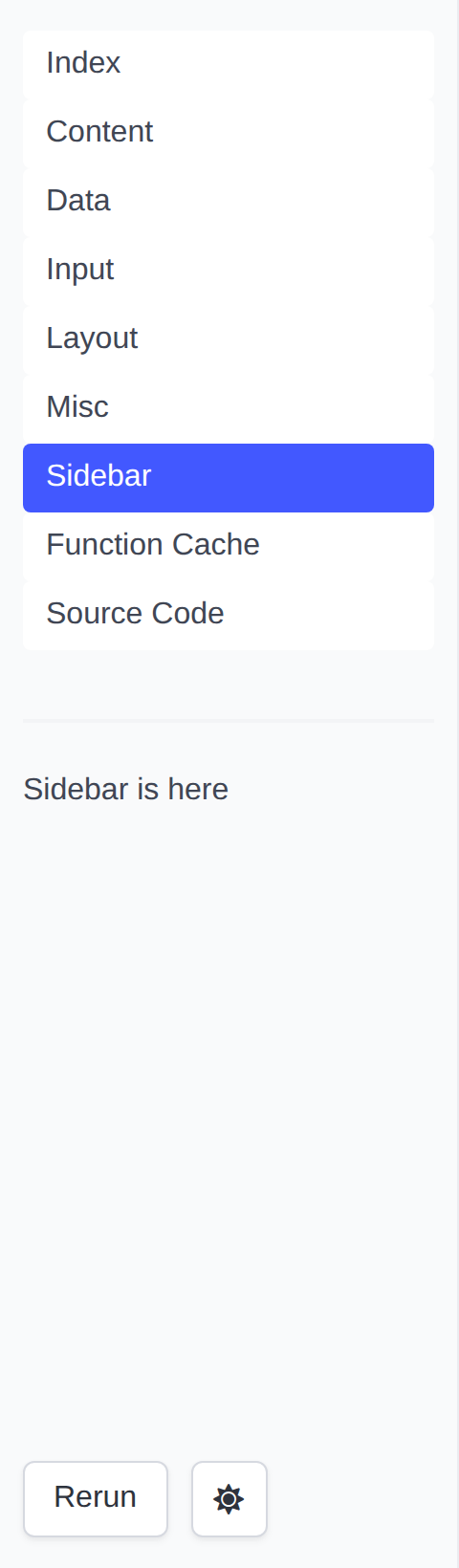
It holds four parts, top to bottom:
- The page list: one link per page in the App. The link of the current page is highlighted, and a page's emoji is shown in front of its title. A page the App declares Hidden is left off the list, except while it is the page being read. When the list would hold only the page being read -- a single-page app -- it is left out.
- The page's Sidebar container, when the page func puts anything in it.
- The app controls:
- Rerun: Rerun the Page Func without changing any state.
- Dark/Light Mode Switch: Switch the theme of the app. Until it is used,
the app follows the browser's
prefers-color-scheme; the choice is remembered afterwards. - A spinner, shown while the app is running the Page Func.
- The toolgui version the app was built against. Click it for the About dialog.
The page list is the part that scrolls: an app with more pages than the column is tall gets a scrollbar on the list, and the sidebar, the controls and the version line under it keep their place.
On a narrow screen the column collapses behind a Menu button. What the
button opens is a bar that fits the screen: the list is capped there too, so
the controls under it are where they can be reached rather than below every
link the app has.
Shared selection
A choice that belongs to every page -- a group picked in the sidebar -- can follow the user from page to page. Declare its query key sticky:
app.SetStickyQuery("group")
The page list then copies group from the current page query into the page
it opens, and so does a PageLink that
does not set group itself. Other keys are left behind. Each page keeps its
choice in the URL with p.ReplaceQuery, and reads it back from p.Query:
var groups = []string{"a", "b", "c"}

// groupSelect draws the shared Select. Both pages call it.
func groupSelect(p *tgframe.Params) *int {
	// Untrusted: only a known group seeds the input.
	conf := &tgcomp.SelectConf{}
	if def := slices.Index(groups, p.Query.Get("group")); def >= 0 {
		conf.SetDefault(def)
	}
	idx := tgcomp.Select(p.Sidebar, "Group", groups, conf)

	q := url.Values{}
	if idx != nil {
		q.Set("group", groups[*idx])
	}
	p.ReplaceQuery(q)
	return idx
}

func Summary(p *tgframe.Params) error {
	if idx := groupSelect(p); idx != nil {
		tgcomp.Text(p.Main, "Summary of "+groups[*idx])
	}
	return nil
}

func Detail(p *tgframe.Params) error {
	if idx := groupSelect(p); idx != nil {
		tgcomp.Text(p.Main, "Detail of "+groups[*idx])
	}
	return nil
}

func main() {
	app := tgframe.NewApp()
	app.AddPage("summary", "Summary", Summary)
	app.AddPage("detail", "Detail", Detail)
	app.SetStickyQuery("group")
	// ...
}
Pick b on Summary and the link to Detail reads /detail?group=b, so Detail
opens with b selected. The links are real URLs: a middle-click opens the
page in a new tab with the same group. It works the same in hash mode, wasm
and Wails; Wails just has no address bar to show it.
Width
Drag the column's right edge to resize it, between 180px and 480px. The handle
is also a keyboard control: focus it and the arrow keys move the edge in 16px
steps, Home and End go to the bounds, and Enter — or a double click —
puts it back to the default 240px.
The button at the top of the column collapses it to just that button, handing the whole width to the page; the page's Sidebar container keeps its state while hidden. Both the width and the collapsed state are remembered in the browser, so they survive moving between pages.
Neither applies on a narrow screen, where the column is a bar across the top
and the Menu button owns it.
Version
The version line reads the module version out of the binary's build info, so an
app that depends on a released toolgui shows that tag with nothing to configure.
A build off an untagged checkout shows the pseudo-version the toolchain derives
from the commit, v0.0.0-{date}-{revision}.
Only a build whose info names no commit at all falls back to a version recorded
in the source: go run, a tree with no VCS metadata, or -buildvcs=false,
which the wails CLI passes on every build. A release records its own tag there;
anything built off dev reports v0.0.0-unknown rather than claiming a release
it is not.
Hide it with:
app.SetShowVersion(false)
About
Clicking the version line opens an About dialog: the app's own introduction on top, then the toolgui version with a link to its repo and docs. ESC or the close button dismisses it.
Set the introduction, in markdown, with:
app.SetAbout("# My Tool\nConverts CSV to JSON.")
With SetShowVersion(false) the line reads About and the dialog shows only
the introduction; with neither, the line is gone.